
A draft looks wrong
A draft that does not read quite right is normal, and usually a quick fix. The trick is to match the fix to the symptom: a wrong tone, a wrong fact, and a wrong answer each have a different cause — and a different lever to pull.
You are always in control of every draft. Nothing sends without you (unless you have deliberately turned on auto-send for a rule), so a draft that needs work costs you nothing but a moment. Read it, spot what is off, make the matching change below, then test it again. Most drafts come right after one or two small adjustments.
The words are reasonable, but the voice is off — too formal, too casual, too long, the wrong sign-off. This is the most common one, and the easiest to fix.
Start with your writing voice. You describe your tone once in Settings, and every draft is written to match it. If drafts feel stiff, tell it to be warmer and more conversational. If they ramble, ask for shorter, more direct replies. Be specific: name the greeting you use, how you sign off, whether you like contractions, and roughly how long a reply should run.
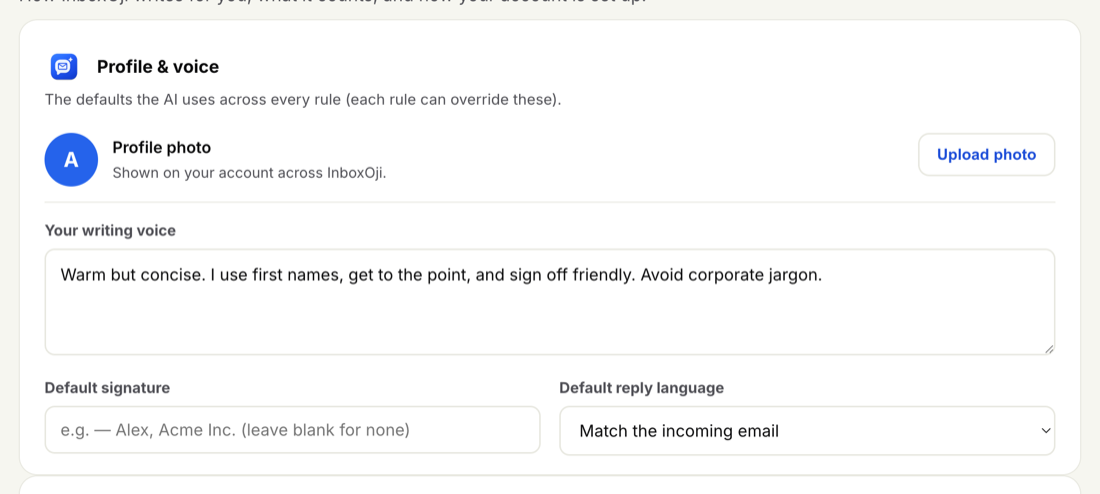
For the full how-to, see Set your writing voice. After you change it, run a test on a real example to hear the difference.
If the overall voice is right but one Rule comes out wrong — say, longer or more apologetic than the rest — you can fine-tune that Rule directly. Open the Rule and adjust its "When:" description and any tone or length guidance you have given it. The voice in Settings sets the baseline; a Rule can nudge it for that one situation.
The tone is fine, but a detail is off — the booking link is wrong, a price is out of date, or a policy is fuzzy. When InboxOji does not have a fact, it does its best to phrase around the gap, and that is where a wrong detail can slip in. The fix is to give it the exact information so it never has to guess.
Use a Variable for exact values PRO+
A Variable is a reusable value — a booking link, an address, a phone number — that drops into drafts exactly right via a token like {{booking_link}}. Save it once and every draft uses the correct value, character for character. See Variables.
Attach a Knowledge file for reference information PRO+
For anything longer than a single value — a price list, a returns policy, an FAQ — attach a document to the Rule. InboxOji reads it when it drafts, so replies stay accurate instead of approximate. Knowledge is per-Rule, so each Rule can carry its own files. See Knowledge base.
A short, fixed value that should appear word for word is a Variable. A body of reference text the reply should draw from is a Knowledge file.
The draft is well written, but it does not address what the email actually asked — it picked the wrong Rule. Each Rule handles one situation, and for every email InboxOji picks the single Rule that fits best (or drafts nothing if none do). When two Rules look similar, it can pick the wrong one.
- Two Rules overlap. Tighten each Rule's "When:" description so they are clearly distinct. Spell out what makes this situation different from the other — the words a real email would use, the specific request it covers.
- No Rule fit the email. If a kind of message keeps getting no draft, or the closest Rule is a stretch, add a new Rule for that gap so InboxOji has somewhere to land it.
See Add and edit rules for how to word them, and Write a Rule that fits for shaping a Rule as a whole.
If you have refined the voice, given it the facts, and sorted out your Rules, and drafts still miss the mark, you can try a more capable drafting model PRO+ in Settings. A stronger model can handle subtler or more complex emails. In practice, though, voice and Rule fixes do far more of the work — reach for the model only after those. See Choose your AI model.
This is the habit that ties it all together. After every adjustment — voice, Variable, Knowledge file, Rule, or model — run the same real example through the Test panel and read the new draft. Keep a few genuine emails on hand as your test set. Running them after each tweak is the fastest way to see whether a change actually helped.
You do not have to fix a draft before you use it. Edit it and send as normal — it is your inbox. Notice the edits you keep making: the same small change, again and again, is a precise map of what to adjust in your voice or a Rule. Fix it once there, and future drafts arrive already right.