
Test a rule before publishing
Before a Rule ever touches your real mail, you can see exactly what it would write. The Test panel lets you paste in a sample email and read the draft InboxOji would create — privately, with nothing sent and no real mail touched.
Testing is the safest way to get a Rule right. You paste an example email, run it, and see whether it matched and the full draft, word for word. Nothing leaves your account and no real email is touched. You can try as many examples as you like, tweak the Rule, and try again until the drafts read the way you want.
- Open the Rule
Go to Rules and click the Rule you want to check to expand it. A Rule does not need to be live to test it — testing a draft is exactly the point.
- Click Test
Open the Test panel for that Rule. This is your private sandbox: anything you run here stays between you and the panel.
- Paste a realistic example
Drop in a sample email — both the subject and the body — that looks like the real thing you get. The closer it is to a genuine message, the more trustworthy the result.
- Run test
Hit Run test. InboxOji reads the example, picks the rule that fits, and writes the draft right there in the panel.
- Read the result
Check whether it matched and read the draft from top to bottom, the way your customer would.
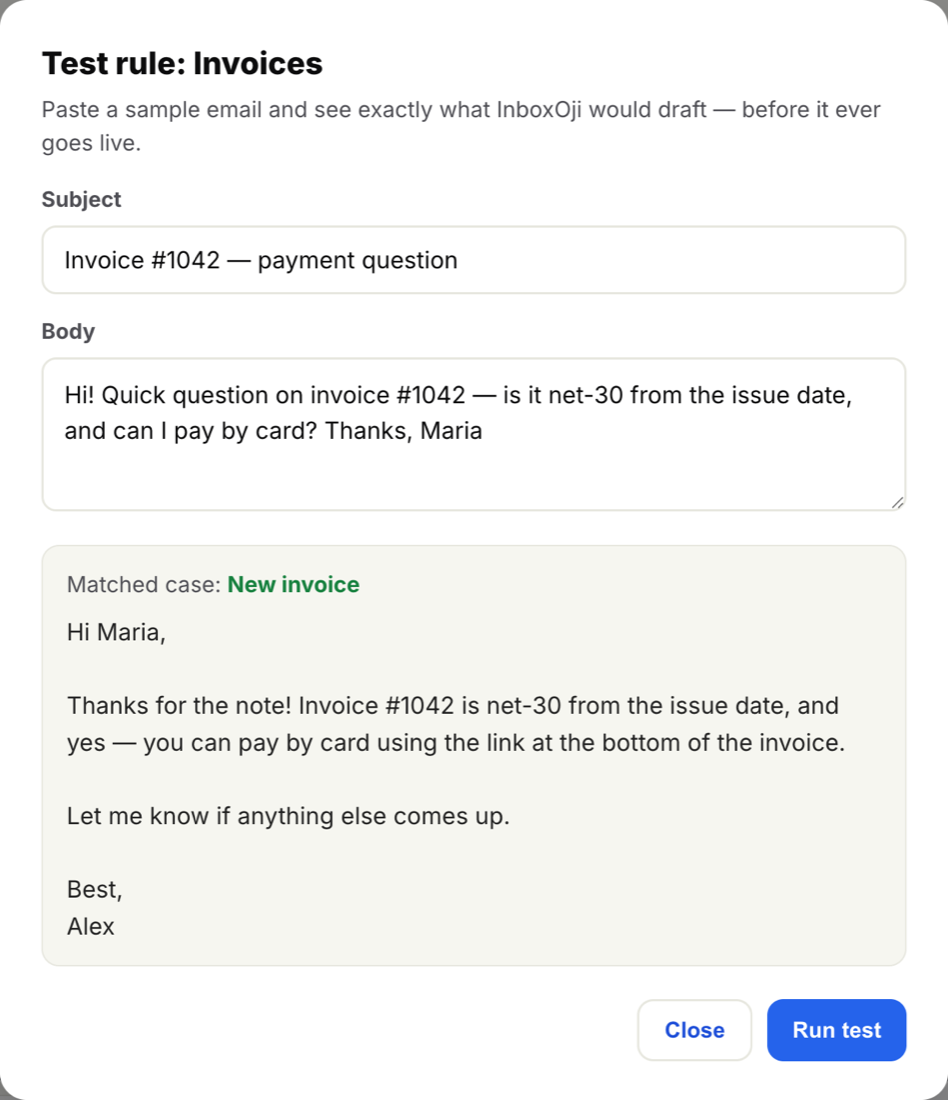
Every test tells you two things: which rule matched, and the draft that rule produced. If the email fits one of your rules, you see its name (for example, "New invoice") and the complete reply below it. If nothing fits, InboxOji tells you so plainly — and that is a good answer, not a failure. On real mail, an email that matches no rule simply gets no draft and is left for you to handle yourself.
Read the draft as your reader would. Is the tone yours? Are the details right? Did it pick the rule you expected? If something is off, adjust the Rule and run the test again — see When a draft looks wrong.
Try several examples, including the awkward ones
One passing test is reassuring. A handful is convincing. Before you make it live, push the Rule a little:
- A clear, typical email — the bread-and-butter message this Rule exists for. The right rule should match and the draft should read well.
- An edge case — a short, vague, or oddly worded version of the same request. See whether the correct rule still matches.
- One that should match nothing — an email that is off-topic for this Rule. You want InboxOji to draft nothing here. Confirming it stays quiet is just as important as confirming it replies.
Keep a few real emails handy as your test set. Running the same examples after each change is the quickest way to see whether a tweak helped or hurt.
This loop is the habit that builds trust. Test a sample, adjust the rule's wording or your writing voice, test again, and repeat until the drafts come out the way you would write them yourself. Only then move the Rule to Published, where it begins drafting on real mail — see Drafts vs. published rules.
A blank test panel is the cheapest place to be wrong. Get it right here, before a single real email is involved.
Testing is also how you safely qualify a rule for auto-send later. Once a rule passes the same examples reliably, time after time, you have the evidence to trust it enough to let InboxOji send those replies for you — see Turn on auto-send. Auto-send is off by default and opt-in per rule, so this testing step is exactly the groundwork it expects.