
Choosing an AI model
The AI model is the engine that writes your drafts. On Pro and Enterprise you can choose which one InboxOji uses, so you can trade a little speed for a little extra nuance, or the other way around. On Starter, InboxOji uses a balanced default that works well for most replies.
For most people, the default is the right answer and you never need to touch this setting. But if you write unusually tricky replies, or you handle very high volume, picking a different model can help. PRO+ Choosing your own model is a Pro and Enterprise feature.
Your model lives in Settings, under AI model. It is a single dropdown. Pick one, save, and every new draft is written with that model.
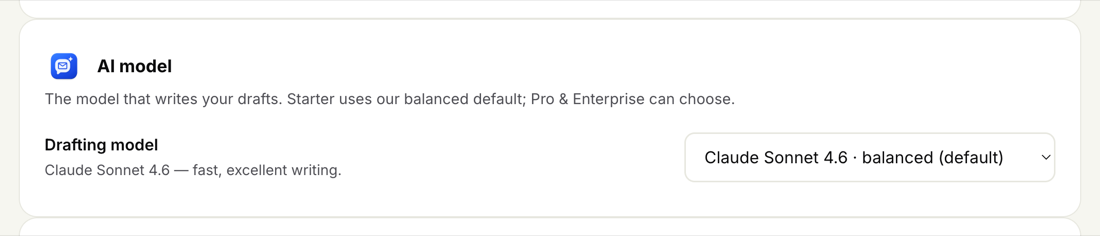
Each model is good at slightly different things. Here is what they are best for, in plain terms:
- Claude Sonnet 4.6 — balanced (default). Fast, with excellent writing. This is the right choice for most people and most replies. If you are not sure, leave it here.
- Claude Opus 4.8 — most capable. The strongest at nuance and judgment. Worth choosing when your replies are tricky or high-stakes — long, detailed answers, delicate situations, or anything where getting the wording exactly right really matters.
- Claude Haiku 4.5 — fastest. The quickest of the bunch. A good fit when you handle a high volume of short, simple replies and want drafts ready as fast as possible.
- OpenAI GPT-4.1 — alternative. A capable option from a different maker, here if you simply prefer it.
You do not need to study the list. A simple way to decide:
- Start on the default. Claude Sonnet 4.6 handles the great majority of everyday replies beautifully. Give it a week before changing anything.
- Step up if drafts need more nuance. If your replies are complex or high-stakes and you find yourself reworking the wording, switch to Claude Opus 4.8 for more careful, considered drafts.
- Step down if you live on volume. If you answer a flood of short, routine emails and just want drafts quickly, Claude Haiku 4.5 is the fastest.
You can change the model any time, and there is no penalty for switching. A change applies to future drafts — anything already drafted stays as it was written.
If a draft feels off, switching models is usually not the fix. Nine times out of ten, refining your writing voice or tightening the rule's wording helps far more. Try that first — see A draft looks wrong — and reach for a different model only if drafts still need more nuance after that.
Want a deeper look at making drafts sound right? Read Your writing voice.