
Set your writing voice
Teach InboxOji how you write once, and every draft sounds like you — not like a robot, and not like a stranger. You describe your tone in plain words, and the AI matches it on every reply, across every rule.
Your writing voice is the single setting that does the most to make drafts feel ready to send. Get it right early and you will spend less time rewording and more time just reviewing and hitting send.
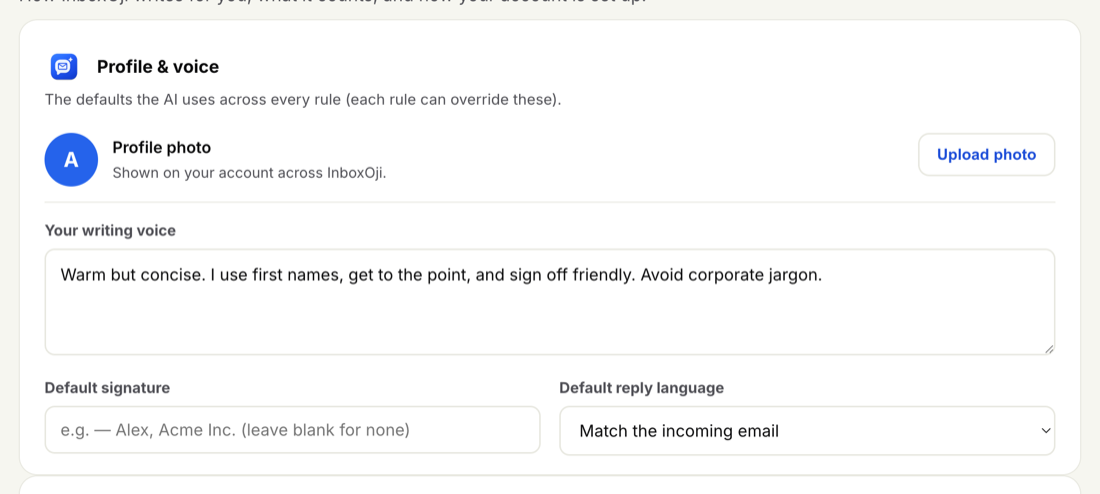
Your voice lives in Settings, under Profile & voice. There is a single text box where you describe, in your own words, how you like to write. You set it once; you can adjust it any time.
-
Open Settings
From the top navigation, go to Settings.
-
Find the writing-voice box
Look under Profile & voice for the writing-voice text box, just below your name.
-
Describe how you write
Type a short description of your tone. Use concrete traits, not vague ones — see the example below.
-
Save
Save your changes. From now on, every new draft is written in that voice.
The best descriptions are specific. Instead of "professional" or "friendly" — words that mean different things to different people — name the things you actually do. Think about how you greet people, how long your replies usually are, and the words you would never use.
Good traits to mention:
- Warmth and formality. "Warm but brief." "On a first-name basis." "Polite, never stiff."
- Length and shape. "Always thank them, then answer in two or three sentences." "No long preambles."
- Words to avoid. "No corporate filler." "Never say 'reach out' or 'circle back'."
- How you sign off. "Sign off with just my first name." "Always end with 'Talk soon'."
Here is an example that puts those together:
Write the way I do: warm but brief, on a first-name basis. Open with a quick thanks, then answer in two or three sentences — no corporate filler, no long preambles. Plain, everyday words. Sign off with just my first name, Maya.
That single paragraph gives the AI enough to match your greeting, your length, your word choices, and your sign-off — on every reply it drafts.
Your writing voice is the default for every draft, across every rule. Set it once and it carries through to invoice replies, booking confirmations, follow-ups — all of them.
If one situation needs a slightly different touch — say, a more formal tone for a particular kind of email, or a shorter answer — an individual rule can still adjust its own tone and length on top of your default. Your voice is the foundation; a rule only nudges it where needed.
Stuck on what to write? Look at one or two replies you have actually sent and jot down what makes them sound like you — how you opened, how long they were, how you signed off — then paste those notes straight into the box. You can change your voice any time, and the next drafts pick up the change right away, so it is easy to adjust as you go.
Want to go deeper — how the voice interacts with examples, edits over time, and tricky tones? Read Your writing voice. Ready to put it to work? Head to Create your first rule (step by step).