
Write a rule that doesn’t mis-fire
A well-scoped rule drafts the right reply for the right email — and stays quiet when it isn't sure. This guide shows you how to shape your rules so they fit the mail they're meant for, and only that mail.
A rule "mis-fires" in one of two ways: it drafts the wrong reply, or it drafts something when it should have left the email alone. Both come from the same cause — the rule is scoped too loosely. The fix is to be precise about what each rule covers. Tighten the scope and the mis-fires disappear.
A rule is for one situation you handle over and over. "Invoice questions" is a situation. "Booking requests" is another. Keep them separate. The clearer the situation, the easier it is for InboxOji to tell when an email belongs to that rule and when it doesn't.
The temptation is to make one big catch-all rule and pour everything into it. Resist it. When a rule tries to cover invoices and bookings and refunds and general questions all at once, the AI has too many possibilities to weigh, and it picks the wrong one more often. Narrow rules draft more accurately.
Remember that InboxOji only acts on mail that matches a rule you've made live — everything else stays private and untouched. So a narrow, well-described rule means InboxOji is only ever drafting on the handful of emails that fit. It never touches the rest of your inbox.
If a rule's description is wide enough to catch mail it shouldn't — say a general "Support" rule that scoops up sales questions, complaints, and refunds together — the rule will try to answer all of it and guess wrong. Give each distinct situation its own rule, described tightly so it only matches that situation.
Each rule has a plain-language "When:" description. This is the single most important thing you write. It's how InboxOji decides whether a rule matches an email — or whether none of your rules do.
Describe the trigger the way you'd explain it to a new teammate. "When a first-time prospect asks about pricing" is clear. "Pricing" is not. The more specific the description, the more reliably the AI matches the right email to the right rule.
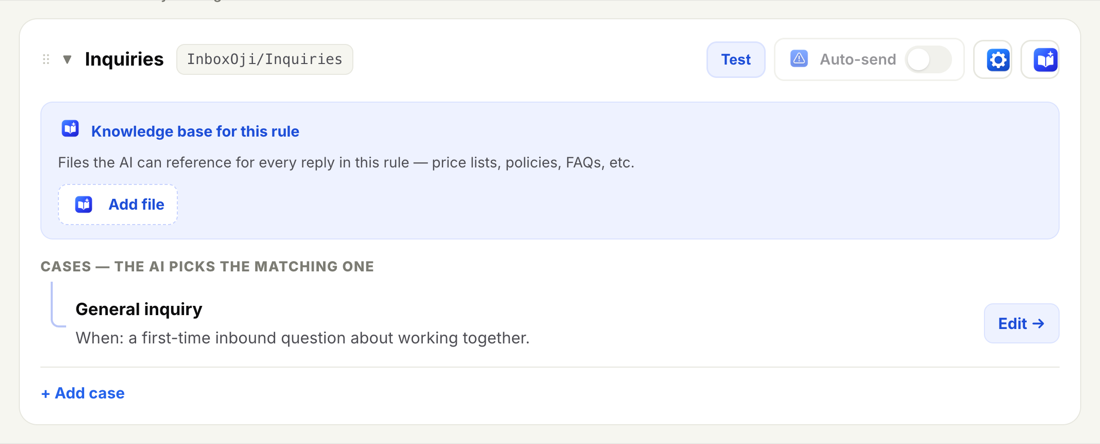
When two rules cover related situations, make each "When:" describe not just its own trigger but what sets it apart from the others. If two rules overlap, the AI can't tell them apart. For example:
- New invoice question — when a customer asks about an invoice they just received and hasn't paid yet.
- Paid notice — when a customer says they've already paid and wants confirmation.
Those two won't get confused, because each description spells out what makes it different. Vague neighbours like "invoice stuff" and "payment stuff" would. For more on building these out, see Add and edit rules.
If an email doesn't clearly match any rule, InboxOji drafts nothing. That is the behaviour you want. A missing draft is easy to spot and handle yourself. A confidently wrong draft sitting in your inbox is the thing that erodes trust.
So when you find an email your rules skipped, don't loosen an existing rule to swallow it. Instead, add a new rule for that gap, with its own clear "When:". You grow coverage one precise rule at a time, and nothing else gets blurrier in the process.
A rule that stays quiet when unsure is doing its job. Fill the gaps with new rules, not looser ones.
Scoping decides which reply gets written. Facts decide whether that reply is correct. If a draft needs your real prices, your address, or your booking link, give InboxOji those exact details instead of hoping it remembers them.
- Variables and Snippets PRO+ — store a value like
{{booking_link}}or a ready-made block of text once, and InboxOji drops it into drafts word-for-word, exactly right. - Knowledge base PRO+ — attach a price list, policy, or FAQ to a rule, and replies reference the real document. It's per-rule, so each rule can have its own files.
With the facts supplied, the AI doesn't have to invent details — which is another common source of a reply that looks fine but is quietly wrong.
Every new rule starts as a draft and does nothing until you make it live. Use that window. Before you make it live, run a few real emails through the Test panel and read what InboxOji would write. See Test a rule for how.
- Test with real examples
Paste in emails you've actually received — including a tricky one and one the rule shouldn't answer. Check that the right rule matches each, and that the awkward one gets no draft.
- Refine the rule that missed
If a draft picks the wrong rule or invents a detail, sharpen the "When:" description or add the missing fact. Tighten the rule rather than widening it.
- Make it live when you trust it
Once the tests look right, move the rule into Published. Only then does it start drafting on live mail.
When a published rule produces a draft that isn't quite right, the same loop applies — the answer is almost always a tighter rule description or a supplied fact. When a draft looks wrong walks through the common fixes.
Think of your rules as a short, clear list of "if this exact situation, then this kind of reply." A handful of well-described rules beats one rule trying to cover everything.