
Knowledge base
Attach your real documents to a rule, and InboxOji answers from them instead of guessing. Price lists, policies, hours, product details — the AI reads what you give it, so replies stay accurate.
The knowledge base lives inside a rule. Each rule can have its own files, so a rule about invoices can reference your rate card, while a rule about bookings references your hours and location. When InboxOji drafts a reply for that rule, it looks at those documents and answers from them. PRO+
Without a knowledge base, the AI writes in your voice but works only from what's in the email and your rule's own description. That is fine for simple replies. But the moment a question needs a specific fact — a price, a return window, your opening hours — you want the AI to quote your real information, not approximate it.
Attach the document once, and every draft in that rule can reference it. Ask "how much is a follow-up session?" and the reply pulls the number from your rate card. Ask "what's your returns policy?" and the reply reflects what your policy actually says.
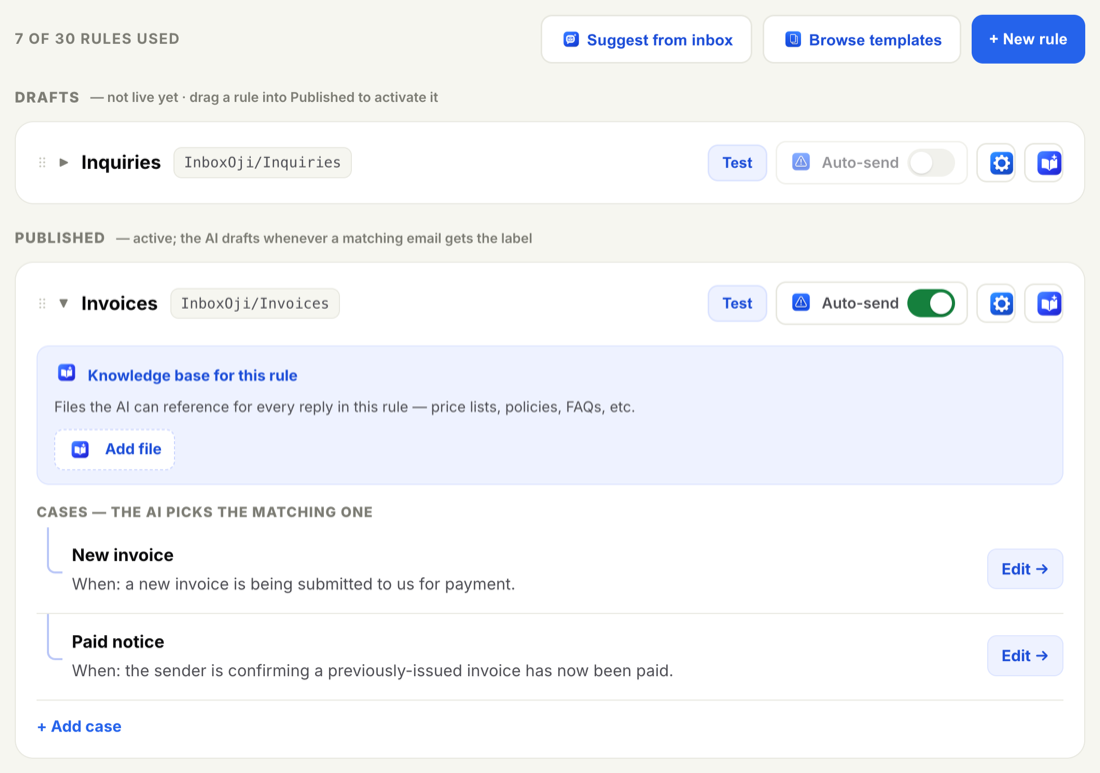
- Open the rule
Go to Rules and click the rule you want to expand.
- Find the Knowledge base row
Inside the expanded rule, look for the Knowledge base row inside the rule.
- Use Add file
Click Add file and choose the document from your computer. You can add more than one to the same rule.
- That's it
From now on, every draft InboxOji writes for that rule references the files you attached. There is nothing else to switch on.
Attach anything a reply needs to be accurate about. Good candidates:
- A rate card or price list
- Your returns, cancellation or refund policy
- Opening hours and location details
- A product spec sheet or service description
- A short FAQ you answer the same way every time
Match the files to the rule. A rule for invoice questions wants the rate card and payment terms; a rule for booking enquiries wants hours, location and your cancellation policy.
Three tools help the AI get the details right. They do different jobs:
- Variables are exact values dropped in word for word — a booking link, an address, a phone number. Use a variable when the reply must contain that exact value, like
{{booking_link}}. - Snippets are exact passages — a ready-made block the AI drops in unchanged, such as a booking call-to-action or a directions paragraph. Use a snippet when you want the same wording every time.
- Knowledge base is reference material the AI reads to answer correctly, then writes in its own (your) words. Use it when the reply needs to be accurate but the wording can vary.
A simple rule of thumb: if you need the exact text to appear, reach for a variable or snippet. If you need the AI to know a fact and answer from it, reach for the knowledge base.
The AI is only as accurate as the documents you give it. When your prices, hours or policies change, replace the file in the rule so drafts keep reflecting the truth.
The files you attach are used only to write your drafts, and they stay in your account. Your content is never used to train AI models. As with everything in InboxOji, the AI references your knowledge base only for the rule it belongs to — it does not look beyond the emails your rules match.
Once your files are in place, it's worth checking the result. Open the rule's Test panel, paste a sample question, and confirm the draft quotes your real details. See Write a rule that fits for how to set a rule up well in the first place.