
No drafts are appearing
If a draft you expected is not waiting in your inbox, do not worry — it is almost always one of a handful of simple causes. Work down this checklist in order and you will usually find it within a minute or two.
InboxOji only drafts when a few things line up: the rule is live, the email genuinely matches one of your rules, and your inbox is connected. If any one of those is missing, no draft appears. The list below covers each in turn.
-
Is the rule published?
This is the most common cause by far. A rule that sits in the Drafts section does nothing — it is a work in progress. Only rules in the Published section draft on real mail. On the Rules page, check which section your rule is in. If it is still under Drafts, drag it into Published or hit Publish.
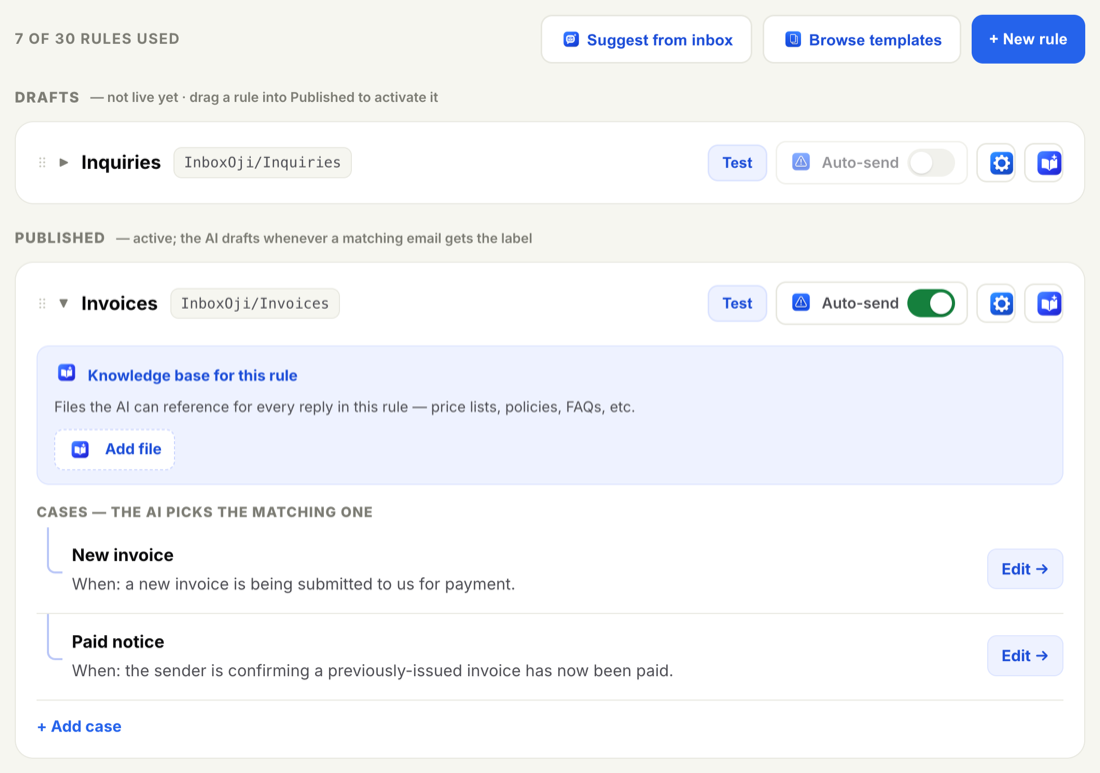
Rules in the Published section are live; rules in Drafts do nothing yet. More on the difference: Draft vs published rules.
-
Does the email genuinely match a rule?
InboxOji only drafts for mail that matches a rule you've made live. No matching rule, no draft. Read the email the way one of your rules describes it: does it really fit the situation that rule covers? If it is a kind of email none of your live rules describe yet, that is why nothing was drafted — write a rule for it, or broaden an existing one so it fits.
How to do that: Your first rule.
-
Does a rule match?
A rule only drafts when it fits the email. If none of your rules match, InboxOji drafts nothing — on purpose, because it would rather stay quiet than guess. If the email is a situation your rules do not yet cover, add a new rule or broaden an existing one so it fits.
How to do that: Add and edit rules.
-
Is your inbox connected?
If your Gmail connection has dropped, drafting pauses until you reconnect. You will usually see a banner letting you know. Reconnect with Google sign-in and drafting resumes.
Walkthrough: Reconnect a disconnected inbox.
-
Have you hit your plan's draft limit?
Each plan includes a number of drafts per period. If you have used up your plan's draft limit, drafting pauses until the next period begins or you upgrade. Check your usage and options on the Billing page, and see Plans explained for what each tier includes.
-
Give it a moment
Drafts are not instant. A reply appears shortly after a matching email arrives, not the very second it lands. If the email only just came in, wait a little and check again before assuming something is wrong.
Use the Test panel to settle the question quickly. Paste in a sample email and InboxOji shows you whether the rule would draft and the exact reply it would write. If Test produces a draft, your rule is fine — check that the rule is live and your inbox is connected. If Test draws a blank, it is a rule problem. See Test a rule.
If you have worked through every item and a draft still is not showing up, we are happy to help — email support@inboxoji.com and tell us the rule name and an example email.