
Plans & what’s included
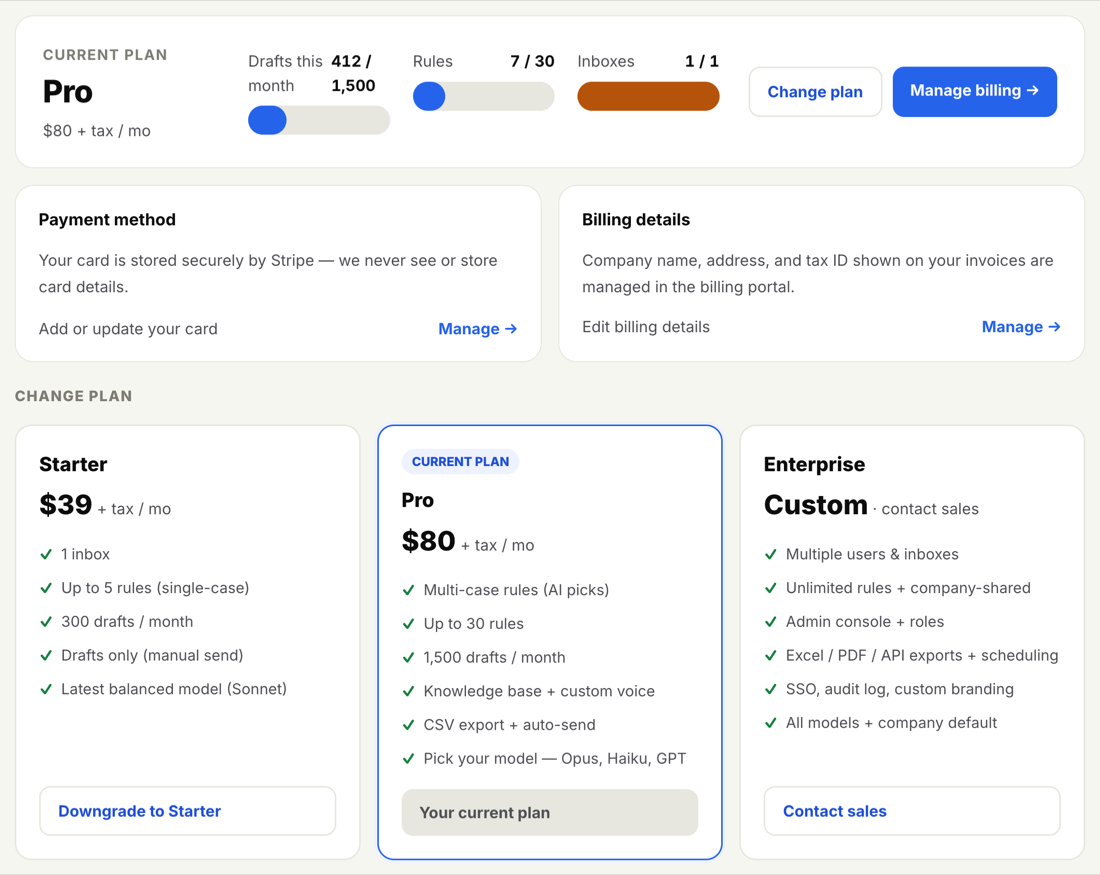
InboxOji comes in three plans: Starter, Pro, and Enterprise. Each one drafts your repetitive replies in your voice and leaves them for you to review and send. The difference is how much you can fine-tune, automate, and share across a team.
Every plan starts with a 7-day free trial, so you can try the features that matter to you before you pay. Here is what each plan includes.
Starter
The essentials, and enough to start saving real time on email.
- Connect your Gmail with Google sign-in.
- Build a set of rules for the situations you handle often.
- Get a draft reply written in your voice, waiting in your inbox for you to review and send.
- Set your writing voice once in Settings so every draft sounds like you.
- See this month's stats on your dashboard: replies drafted and time saved.
Pro
Everything in Starter, plus more control over how drafts are written and the option to automate the truly routine ones.
- More rules: cover a whole topic and its variations with a separate rule for each, and the AI picks the matching one.
- Variables: reusable values like a booking link or address, dropped into drafts exactly right with tokens such as
{{booking_link}}. - Snippets: ready-made blocks of text the AI can drop in word-for-word.
- Knowledge base: attach documents to a rule (price lists, policies, FAQs) so replies stay accurate.
- Model choice: pick the drafting model that suits you in Settings.
- CSV export and full searchable Activity history.
- Auto-send: for replies you trust, let InboxOji send automatically, one rule at a time and reversible.
Enterprise
Everything in Pro, plus the tools to run InboxOji across a team with consistent settings and branding.
- Admin console to invite teammates and manage roles.
- Shared rules rolled out to the whole team.
- Company defaults for writing voice, reply language, and drafting model.
- White-label branding with your logo and brand color.
- Audit log of account activity.
- Custom brand colour & logo on your emails.
- Advanced exports (Excel, PDF, JSON, scheduled) and a read-only API.
You do not have to memorize which plan includes what. Inside the app, any feature that needs a higher plan shows a small marker next to it: PRO+ means it is available on Pro and Enterprise, and ENTERPRISE means it is Enterprise only. When you see one, you will know an upgrade unlocks it.
"PRO+" is shorthand for "this tier and up" — so a PRO+ feature works on both Pro and Enterprise.
Your Billing page is the place to see your current plan, compare all three side by side, and switch. The plan cards there show current pricing for Starter and Pro. Enterprise is custom — pricing depends on your team, so you talk to sales rather than picking a fixed price.
Ready to try a plan? Every plan starts with a 7-day free trial — you add a card to begin and are not charged until day 8, so you can cancel before then and pay nothing. When you want to move up or down, see how to change or cancel your plan.