
Draft vs. Published: activating a rule
Every rule you build lives in one of two places: Drafts or Published. The difference is simple — a draft rule does nothing, a published rule is live. Here is how to tell them apart and how to switch.
When you open the Rules page, you see two sections. Drafts holds rules you are still building or have set aside. Published holds the rules that are actually working. A rule only starts drafting replies on real mail once it sits in Published. Until then, it waits.
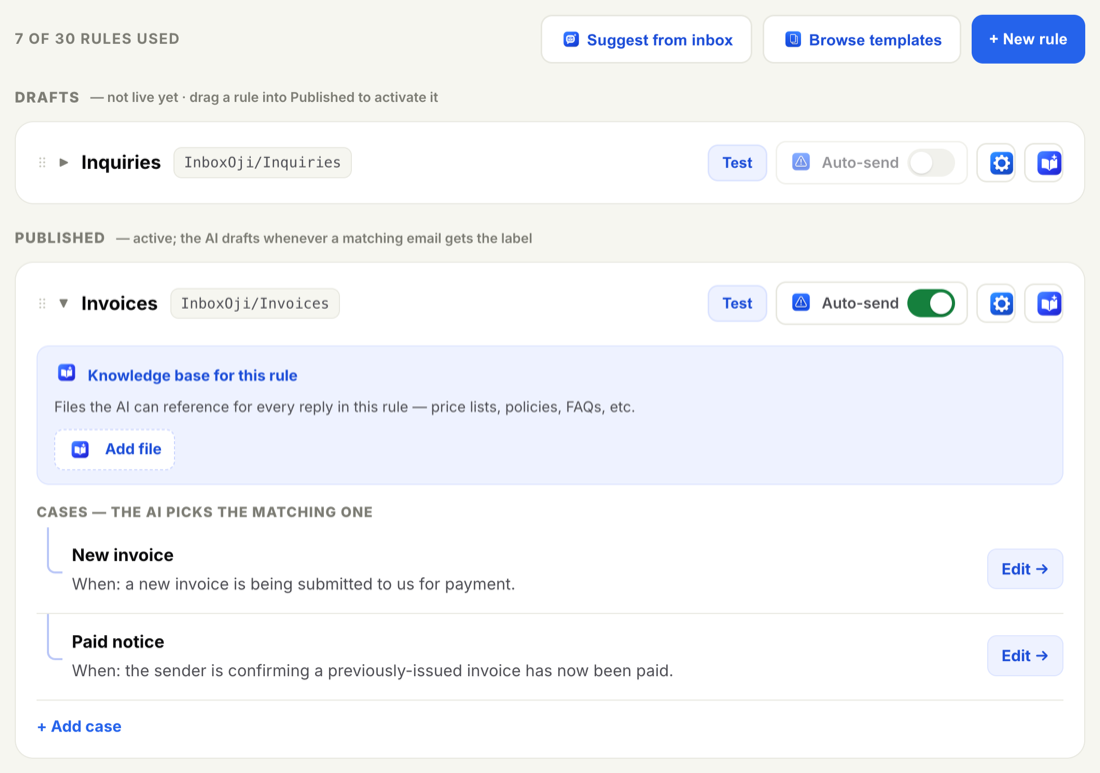
A rule in Drafts is complete or in progress, but switched off. It does not read your mail, and it does not write anything. New rules always start here, so nothing goes live by accident.
This is your workbench. You can name a rule, describe the situation it handles, set the reply it should write, and try it out — all without it touching a single real email. Nothing leaves the Drafts section until you say so.
A rule in Published is on duty. Whenever a new email arrives that matches the situation it describes, InboxOji reads it, picks that rule, and leaves a draft reply waiting in your inbox for you to review and send.
That is the only thing publishing changes. The rule still drafts in your voice, still leaves replies for your approval, and still only acts on mail that matches a live rule. Publishing simply means the rule is now allowed to do its job.
- Open the Rules page
Go to Rules and find your rule in the Drafts section.
- Move it to Published
Drag the rule from Drafts down into the Published section, or open it and hit Publish.
- It starts right away
From that moment, the rule drafts on any new email that matches it. No restart, no waiting.
Test a rule before you publish it. The Test panel shows you the exact draft a rule would write for a sample email, with nothing going live. See Test a rule.
To stop a rule, drag it back into Drafts, or open it and unpublish. It immediately stops drafting on new mail. Nothing is deleted — the rule keeps its name, its description, and its reply, ready to publish again whenever you want.
Pausing is the safe way to take a rule offline for a while. Maybe the topic is seasonal, or you want to rework the rule. Move it to Drafts, make your changes, and publish it again when it is ready. You never lose your work.
The gap between Drafts and Published is there on purpose. It lets you build a rule carefully and test it thoroughly before it touches anything real. You decide the rule is ready — InboxOji never flips it on for you.
Drafts is where you build. Published is where you go live. You control the moment in between.
Publishing affects only new matching email from that point forward. It does not reach back and draft replies for messages that already arrived, and it never changes past threads.
New to building rules? Start with Your first rule, then come back here when you are ready to go live.