
Your writing voice
Your writing voice is the one setting that does the most to make drafts feel ready to send. This is the deeper guide: how to describe your voice so it really sounds like you, how to fine-tune the tone for a single rule, and how to refine it over time when a draft feels a little off.
If you have not set your voice yet, start with Set your writing voice — it walks through the basics in four steps. This article picks up where that leaves off.
Your voice lives in Settings, under Profile & voice. It is a single text box where you describe, in your own words, how you write. You set it once. From then on it shapes every draft, across every rule — invoice replies, booking confirmations, follow-ups, all of them.
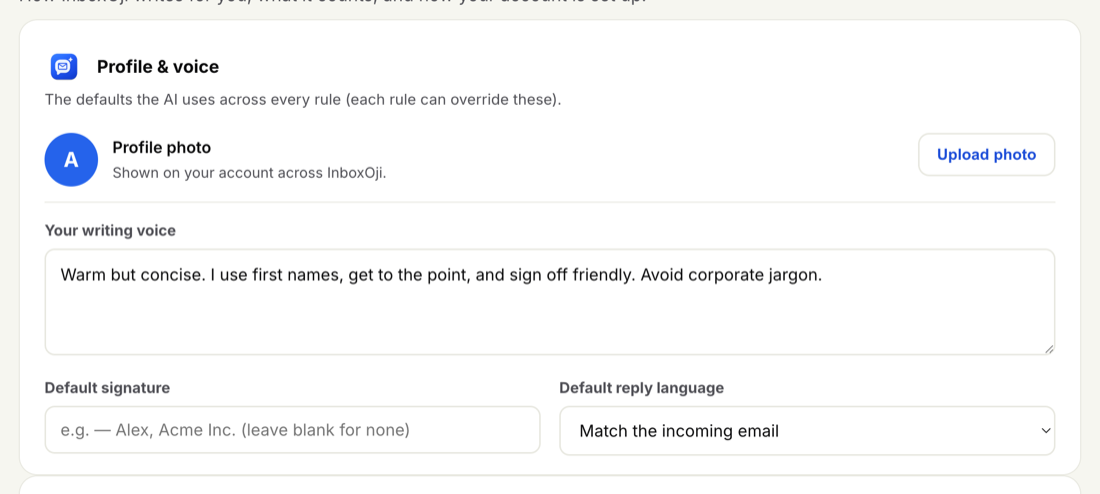
The trick is to be specific. Words like "professional" or "friendly" mean something different to everyone, so they give the AI little to work with. Instead, name the things you actually do on the page. Four kinds of detail carry the most weight:
- Traits and formality. "Warm but brief." "On a first-name basis." "Polite, never stiff." Say how close or how formal you tend to be.
- Greeting and sign-off habits. "Open with a quick thanks." "Sign off with just my first name." "Always end with 'Talk soon'." These are the bookends people notice most.
- Sentence length and shape. "Two or three sentences, no long preambles." "Short paragraphs, plenty of white space." This is what stops drafts reading too long or too curt.
- Words to avoid. "No corporate filler." "Never say 'reach out' or 'circle back'." Naming what you would never write is just as useful as naming what you would.
A strong example
Write the way I do: warm but brief, on a first-name basis. Open with a quick thanks, then answer in two or three sentences — plain, everyday words, no corporate filler and no long preambles. Sign off with just my first name, Maya.
That one paragraph tells the AI how you greet people, how long to keep things, which words to steer clear of, and how to sign off. It has enough to match you on every reply.
A weak example
Be professional and friendly. Keep it nice.
This reads fine, but it leaves every real decision open. How long is a reply? Do you use someone's first name? Do you say "Kind regards" or just your name? With nothing concrete to go on, drafts come out generic — and you end up rewording them. The fix is always the same: trade the vague adjectives for the habits behind them.
Stuck staring at a blank box? Open one or two replies you have actually sent and jot down what makes them sound like you — how you opened, how long they ran, how you closed — then paste those notes straight in. Your own past emails are the best source material there is.
Your Settings voice is the foundation. But not every situation calls for the same touch — a refund reply might read more formal than a booking confirmation, and a quick acknowledgement should be shorter than a detailed answer.
You do not have to change your whole voice for that. An individual rule can nudge the tone and length on top of your default. When you write a rule, the description you give it shapes the reply: a rule for a delicate situation can read warmer or more careful, and a rule for a routine confirmation can stay short and plain. Your overall voice still carries through underneath — the rule only adjusts it where needed.
For more on shaping rules this way, see Add and edit rules.
You will rarely nail your voice on the first try, and that is fine. The best approach is to adjust and re-test in small steps.
-
Notice what feels off
Read a draft and name the one thing that is not you — too formal, too long, the wrong sign-off, a phrase you would never use.
-
Make a small, specific change
Edit your voice description to address just that. "Sign off with just my first name" or "keep replies under three sentences" often does more than a full rewrite.
-
Re-test and compare
Use a rule's Test panel to run a sample email and see the new draft straight away. Small wording changes in the box can shift the result noticeably.
If drafts still come out wrong after a few passes, the cause may be the rule itself rather than your voice. When a draft looks wrong walks through how to tell the difference and what to fix.
The way you sign off in words is part of your voice. The fixed block at the bottom of a reply — your name, title, or contact line — is separate. That is your draft footer, and it also lives in Settings. Set it once and it is appended to your drafts, so you do not have to describe it inside your voice text. Keep your voice for tone, and let the footer handle the standing signature.
Your voice and your emails stay yours. InboxOji writes drafts only for you, in your account, and your email content is never used to train AI models.
One more thing worth knowing: the voice is what your replies sound like; the AI model PRO+ is the engine that writes them. They work together — a clear voice helps any model, and on Pro and Enterprise you can pick the model that suits your work.