
Create a company-shared rule
A shared rule is a rule you build once in the admin console and roll out to your team, so everyone drafts the same kind of email the same way. You set the wording and tone; your teammates get consistent drafts without each having to build the rule themselves.
Shared rules live in Admin → Shared rules. You own them as an admin — members can use a shared rule but can't edit it, which is exactly what keeps the wording consistent across the team. If you're new to how a rule is put together, the user Help center covers the basics in How rules work and Shared rules.
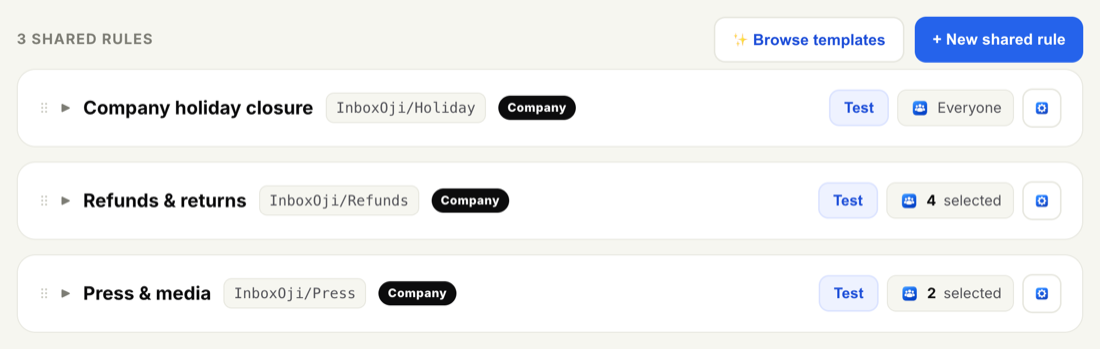
- Open Shared rules
Go to Admin → Shared rules. Click + New shared rule to start from scratch, or Browse templates to adapt a ready-made one — see Start a shared rule from a template.
- Name it
Give the rule a clear name for the situation it handles, like "Holiday hours" or "Invoice received". The name is how you and your team recognize the rule in the console, so keep it short and clear.
- Describe the situation and the reply
Set out when the rule should fire — the situation InboxOji should recognize — and the reply it should draft when it does. InboxOji reads each incoming email and matches it to the rule by its meaning, so describe the situation in plain language rather than worrying about exact wording.
- Choose who it applies to
Set the "applies to" option to Everyone or to selected users. Full detail, including auto-applying to new teammates, is in Apply a rule to everyone or specific people.
- Test it
Use the rule's Test button to draft a sample reply and confirm it reads the way you want before it reaches the team. Adjust the situation, the reply or the rule's tone settings and test again until you're happy.
- Roll it out
Save, and the rule rolls out to the people you chose. From then on, matching emails in their inbox get a draft based on your shared rule — left in Gmail for each person to review and send.
Start with one or two high-volume situations your whole team answers — holiday replies, "we received your invoice", routine intro requests. Those are where consistent wording pays off most.
A shared rule is owned by admins. Teammates can see it and get drafts from it, but they can't change its wording — so the situation is answered the same way no matter who's in the inbox. If a rule needs to change, you edit it once here and the update reaches everyone it applies to. Anyone who wants their own twist on a situation can always build a private rule of their own alongside it.
To fine-tune how a shared rule reads — reply language, tone, and how closely it sticks to your script — see Set a shared rule's tone, language and creativity.