
Change or cancel your plan
You can move up, move down, or stop your plan whenever you like. Everything is handled in one place, and changing your plan never deletes a thing you have built.
Your plan is yours to manage. Upgrade when you want more features, step down if you need less, or cancel if the time has come. You stay in control the whole way, and your rules, voice and history come along with you.
It all starts on the Billing page. There you can see your current plan, your payment method, and the three plans side by side. To make any change, select Manage billing to open the secure billing portal, where your card and invoices live.
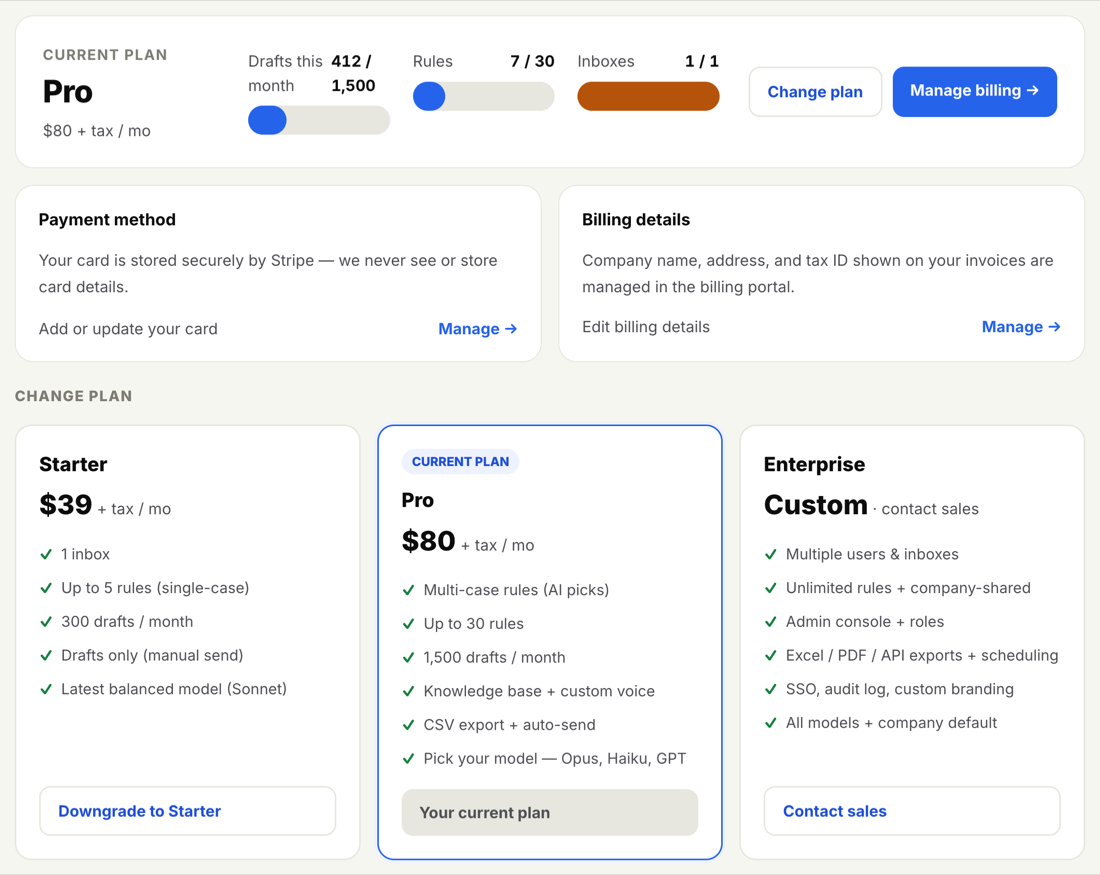
Moving up a plan — say from Starter to Pro — unlocks more features straight away. Going from Starter to Pro turns on Variables, Snippets, the per-rule knowledge base, your choice of AI model, CSV export, full searchable activity history, and auto-send. There is no waiting; the new features are there the moment your plan changes.
Not sure what each plan includes? Plans explained lays it out feature by feature.
Whether you are upgrading, stepping down, or stopping altogether, the path is the same.
-
Open Billing
Go to Billing from the top navigation.
-
Select Manage billing
This opens the secure billing portal, where you can make the change.
-
Choose change plan or cancel
Pick the plan you want to move to, or choose to cancel your subscription.
-
Confirm
Review the change and confirm. An upgrade takes effect right away; a downgrade or cancellation follows the timing shown on screen.
Changing your plan never deletes anything. Your rules, writing voice and activity history are all kept exactly as they are, whichever direction you move.
When you step down a plan, the features above your new plan simply become unavailable. For example, dropping below Pro hides Variables and Snippets, your full set of rules, and your choice of AI model. None of it is erased — it is set aside and waiting. Upgrade again later and everything reappears just as you left it.
If a downgrade would set aside a PRO+ feature you rely on, your existing work is safe. The feature pauses rather than disappears, so you lose nothing by changing your mind.
These are two different things, and it helps to know which one you want.
- Cancel stops your billing but keeps your account and everything in it. You can sign back in and pick up where you left off.
- Delete closes your account and removes everything for good. This cannot be undone.
If you simply want to stop paying for now, cancel. If you want to close the account entirely, see Delete your account.
Enterprise plans are arranged with our team, so seats and terms are not changed in the billing portal. To adjust the number of seats, update your terms, or talk through your options, just reach out to support@inboxoji.com and we will take care of it with you.
For a closer look at your receipts and how to download them, see Invoices and receipts.