
Data residency and retention
When a security or compliance review asks where your team's data lives and how long it's kept, you can answer plainly. This guide gives you the facts InboxOji discloses, and where to find them in your console.
Everything below lives in one place: Settings → Data & residency. The facts are stated on the page itself, so you can screen-share it during a review rather than quoting from memory.
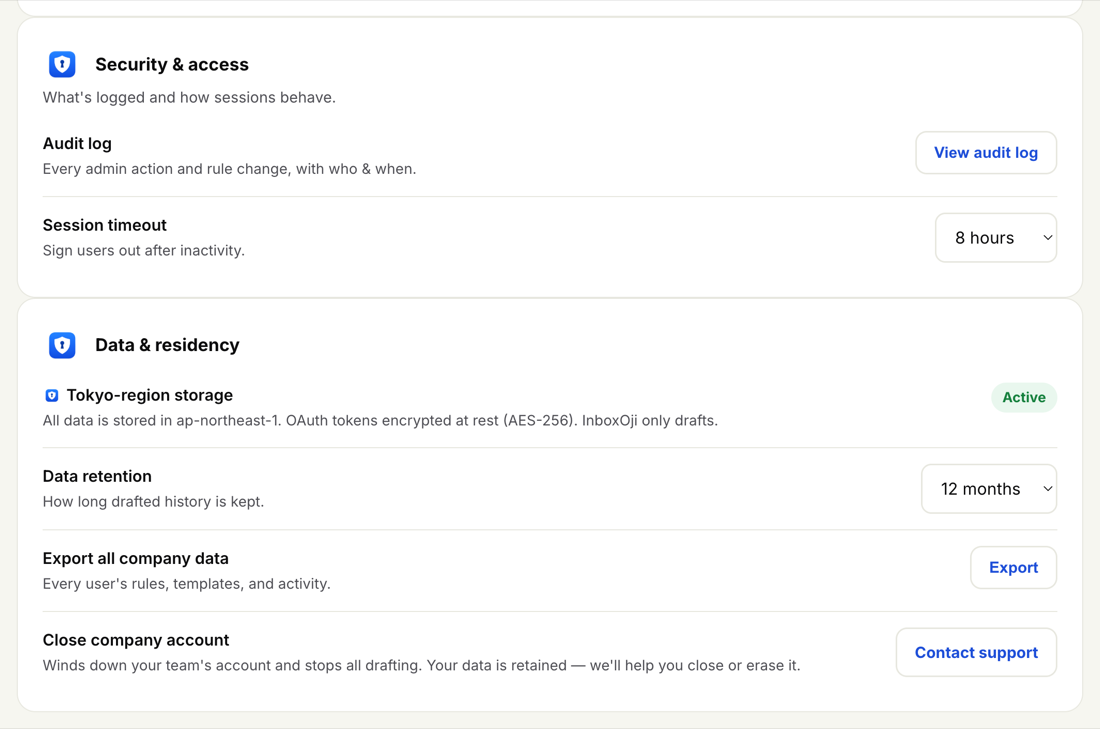
Your team's data is stored in the Tokyo region (ap-northeast-1). Access tokens are encrypted at rest using AES-256. These facts appear directly on the Data & residency panel, marked Active.
InboxOji only drafts. It reads the messages a rule applies to and writes a reply, then leaves that reply in Gmail as a draft. It does not send on its own — a person reviews and sends each draft.
The one exception is deliberate: a user can choose to turn on auto-send for a specific rule, which sends the drafted reply for them. That's a per-rule choice your users make, not a default. You can see which rules auto-send on the Overview "Needs attention" panel, which flags rules that auto-send without a recorded test.
Your team's messages and drafts are used to write your replies — and for nothing else. They are never used to train or improve any AI model.
Data retention is yours to set. On the Data & residency panel, the Data retention setting controls how long drafted history is kept, with three choices:
- 12 months — drafted history older than a year is cleared.
- 24 months — drafted history is kept for two years.
- Forever — drafted history is kept indefinitely.
Pick the option that matches your own retention policy. The setting applies across the whole team and changes the window for drafted history; it doesn't affect the rules and templates your team relies on day to day.
Retention covers drafted history — the record of replies InboxOji has written. If a review needs a full copy of what's on file, use "Export all company data" on the same panel to download every user's rules, templates and activity.
Two actions sit alongside retention on the Data & residency panel:
- Export all company data — a full download of every user's rules, templates and activity, useful for an audit or a records request.
- Close company account — winds the team's account down and stops all drafting. Your data is retained; to close or erase it, contact support@inboxoji.com.
Both are covered step by step in Export or close your company account.
If a reviewer needs more than the disclosures on this page, reach support@inboxoji.com. Pair this guide with the audit log — every admin action and rule change with who and when — and your session timeout setting, and you have a clear picture to share.