
Company voice & model defaults
Set one house voice and a default AI model for your whole company, so every new teammate starts on-brand from day one — without touching a single setting themselves.
When you run InboxOji for a team ENTERPRISE, you don't want each person reinventing your tone or hunting for the right model. You set those defaults once, at the company level, and everyone inherits them. New hires connect their inbox and their drafts already sound like your business.
Open Admin -> Settings and find Company profile & defaults. This page sets the starting point for everyone on the account.
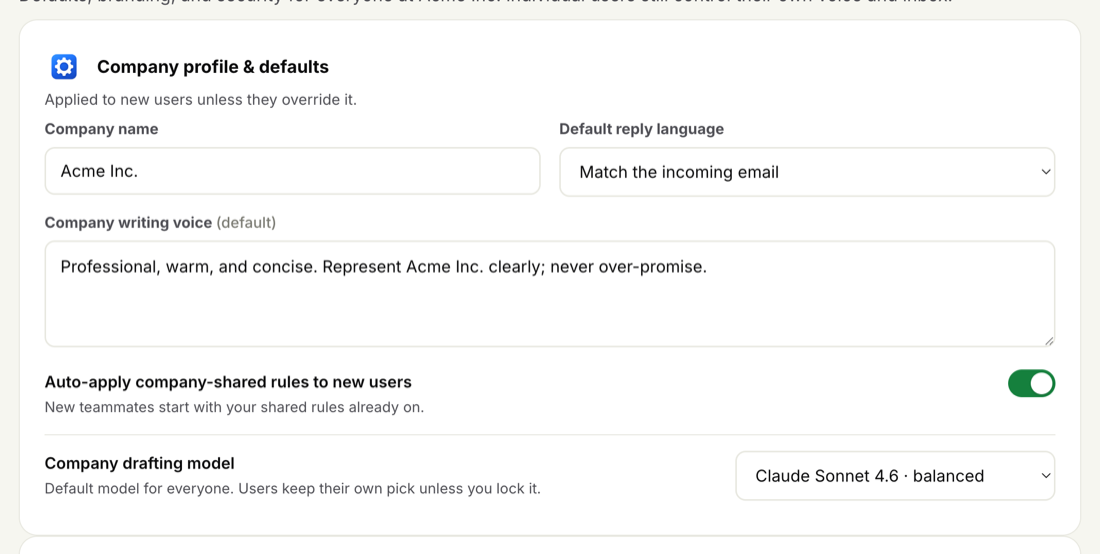
- Company name — how your business is referred to across the team account.
- Default reply language — the language new drafts are written in unless a teammate changes their own.
- Company writing voice — the default tone for everyone. Describe how your business sounds: warm and brief, formal and precise, friendly but professional. Every teammate's drafts start from this voice.
- Auto-apply shared rules to new users — when on, anyone you add to the team gets your shared rules automatically, so they're drafting common replies from their first day.
- Company drafting model — the default AI model for the whole team. You can let users keep their own pick, or lock it so everyone uses the same one.
- Open Company profile & defaults
Go to Admin -> Settings and find the Company writing voice box.
- Describe your house tone
Write a short description of how your business sounds to customers. Think brand, not detail — a few plain sentences are enough.
- Save
From now on, new teammates inherit this voice and their drafts sound on-brand right away.
Keep the company voice short and brand-true — the qualities that should hold across every reply. Let individuals fine-tune the specifics per rule, where the exact wording for a situation belongs.
The company drafting model sets which AI writes drafts by default for the team. You have two choices:
- Let users keep their own pick — the company model is the starting point, but each teammate can switch to a different model for themselves.
- Lock it — everyone uses the company model, and individual model choice is turned off.
For what each model is best at, see Choosing your AI model.
Company defaults are a starting point, not a cage. Unless an admin locks a setting, each teammate can override the company voice or model for themselves in their own Settings — useful when one person handles a different kind of correspondence than the rest of the team.
When you lock the voice or the model, that override goes away and everyone stays aligned to the house defaults. You decide how much room each person gets.
Company voice and model defaults are an ENTERPRISE feature, available from the admin console. On other plans, each person sets their own voice and (on PRO+) their own model.