
Seats and requesting more
A seat is one active person on your account. This guide explains how seats are counted, where to check how many you're using, and how to request more when your team grows.
One active user equals one seat. Anyone you invite who connects their inbox takes a seat for as long as they're active. Roles don't change the count — an Admin and a User each use exactly one seat.
Archived users don't use a seat. When you archive someone, their seat is freed for the next person, while their rules and history stay on file for your records. See Archive or remove a user.
Your seat count appears in two places, always in sync:
- On Users — a Seats meter at the top, e.g. 12 of 15 used.
- On Billing — the same meter alongside your plan and renewal date.
The meter shows seats used against seats on your plan. When you're close to the limit, that's your cue to request more before your next invite.
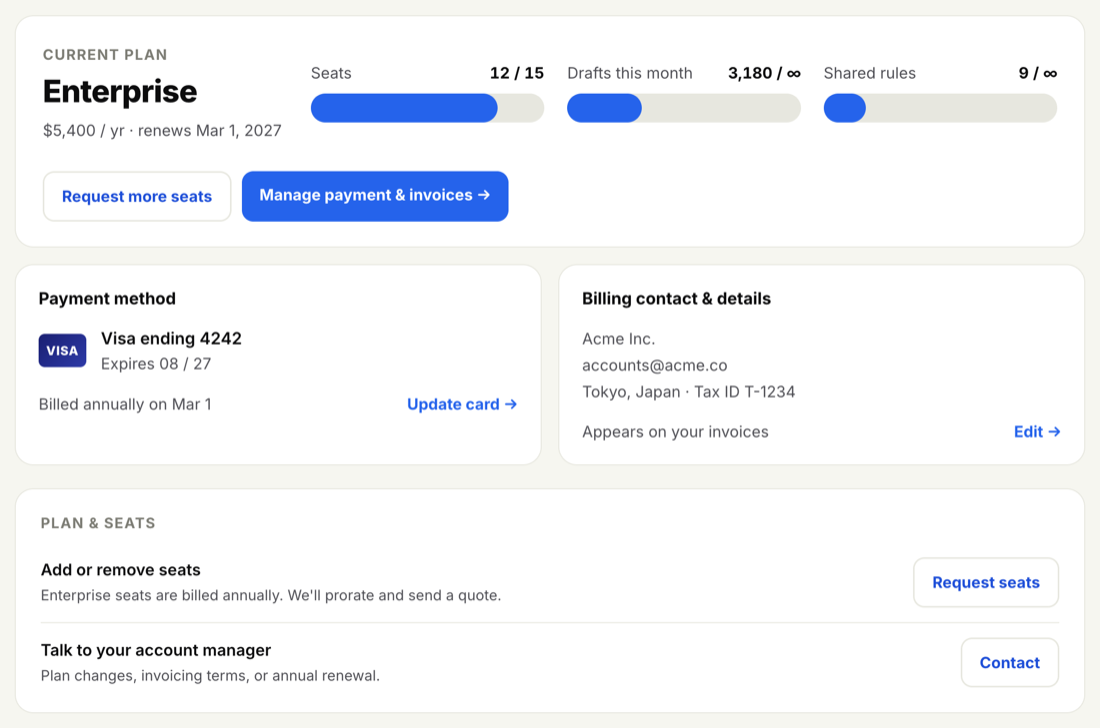
When your team outgrows its current seats, you request more rather than buying them instantly — Enterprise seats are billed annually, so we prorate the change and send a quote you can approve.
-
Open Users or Billing
-
Select "Request more seats"
Use the Request more seats action on either page and tell us how many you'd like to add.
-
We prorate and send a quote
Because Enterprise is billed annually, we calculate the prorated cost for the remainder of your term and send a quote to your billing contact to approve.
Before requesting more, check whether any seats are held by people who've left. Archiving them frees those seats immediately and may cover the new teammate without a plan change.
Adding or removing seats is a billing change. For how the proration, the quote and your annual term fit together — and how to reach your account manager at billing@inboxoji.com — see Add or remove seats.