
Remove the “Drafted with InboxOji” footer
On Enterprise, your team's drafts can go out without the small "Drafted with InboxOji" line. It's one toggle, it applies to everyone, and it saves the moment you flip it.
By default, drafts InboxOji prepares carry a quiet footer line — "Drafted with InboxOji" — at the bottom. On Enterprise you can turn that line off, so the drafts your team reviews and sends look entirely like your company's own. Nothing else about the draft changes: the AI still types, your people still review and send.
- Go to Settings
Open the admin console and choose Settings from the nav.
- Find Branding & white-label
Scroll to the Branding & white-label section. It's the same place you set your company logo and brand color.
- Switch off the footer
Turn off the "Drafted with InboxOji" footer toggle. New drafts will leave it out from then on.
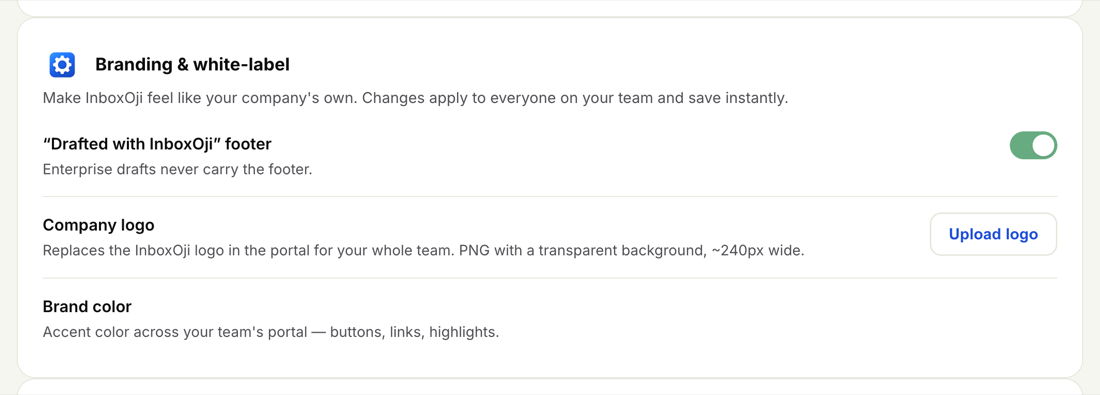
The toggle controls one thing: that small footer line at the bottom of each draft. With it off, the line simply doesn't appear in the drafts InboxOji prepares for your team. The wording, tone and content of each draft are untouched — and as always, every draft still waits in Gmail for a person to review and send.
This setting applies team-wide and saves instantly. You set it once for the whole account; there's no per-user version, and you don't need to ask anyone to change anything on their end.
Dropping the footer is part of Enterprise white-label branding. Pair it with your company logo and brand color so the whole experience reads as your company's, not InboxOji's.
For the rest of your branding controls — the company logo and the accent color used across the team's portal — see Company logo and brand color.